A connected project workspace for people and AI. Keep the reasoning, requirements, work and evidence together, so the next session starts with something to build on.
In practiceI use Continuum to carry the work behind this portfolio forward—from creative software and local AI to connected hardware. It is still evolving, and it already makes that work possible.
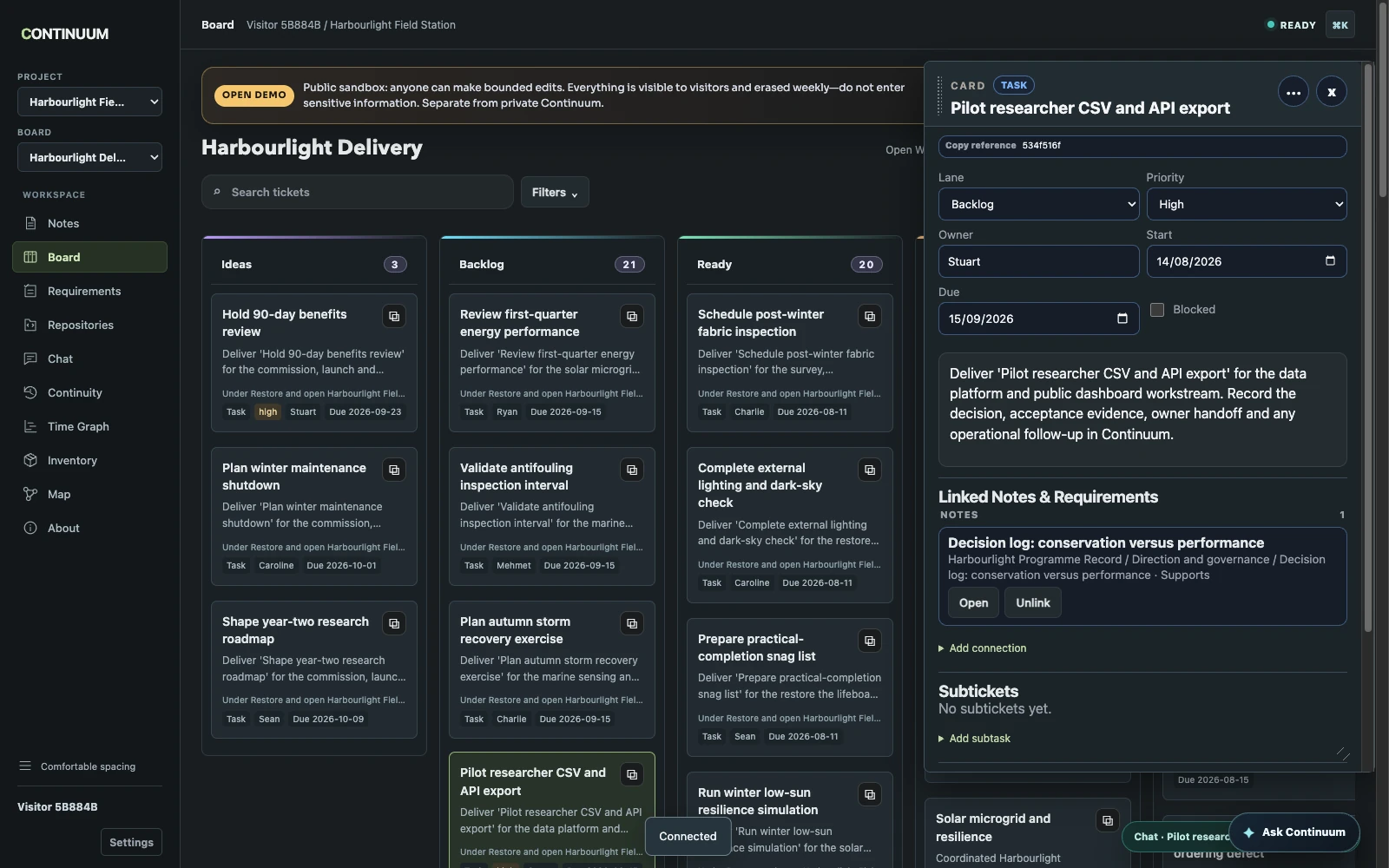
Open a work item and its context comes with it. This Harbourlight task links directly to the decision shown in Notes below.
About this image
Running public web UI; fictional Harbourlight Field Station sandbox · 20 October 2026 Revision: Public demo capture 2026-10-20; image 41994ff36fc1; public UI revision a2dad6e verified separately by the Continuum project
01 / Why I built it
I needed my projects to remember.
Building with AI made it possible to explore and implement ideas much faster. But the work kept outgrowing the conversation. Decisions, constraints and useful discoveries needed somewhere to live after the chat ended.
I built Continuum to hold that thread. It is where I organise the work, keep the reasoning and give a collaborator enough context to continue. When I return to a project, I can find what matters and why it matters.
Continuum has become part of how I build everything else here. It is a working product shaped by that daily use, and a project I am still developing.
The need
Projects outlive conversations. I needed a way to carry decisions, unfinished investigations and the reasons behind the work from one session to the next.
The product
Continuum connects project knowledge, requirements, tasks, communication and evidence in one workspace that both people and AI agents can use.
The connection
A task can lead you back to the decision that shaped it, the requirement it serves and the evidence that it worked. That context stays with the project.
02 / A project that carries forward
Leave the next session somewhere to begin.
The working cycle behind Continuum. A person, an AI agent, or both can pick up the thread.
01
Where did we get to?
Find your place
Recover the current work, project knowledge and handoff. Start with the relevant context and expand what you need.
Agent Entry · Notes · Project Chat
02
Why are we doing this?
Understand the reason
Follow a task to the decision and requirement behind it. Keep intent and acceptance criteria beside implementation.
Requirements · Relationships · Map
03
What can we move forward?
Make the next change
Work within the project’s scope. Record changes with versions and attribution so people and agents can review them.
Board · Versioned project records
04
What should the next session know?
Leave something useful
Save the result, evidence and remaining questions. Give the next collaborator a place to continue.
Evidence · Project Chat · Continuity
↳ The result becomes the context for what comes next.
03 / Inside the workspace
Follow the work, not just its status.
The public demo follows Harbourlight Field Station, a fictional coastal restoration and marine-research project. A programme charter sets the direction; requirements describe what must be true; work and evidence connect back to both.
Use the same project from different angles: read the reasoning in Notes, check the acceptance criteria in Requirements, follow delivery on the Board, or explore the relationships in Map.
01 / Keep the reasoning
The project has a memory.
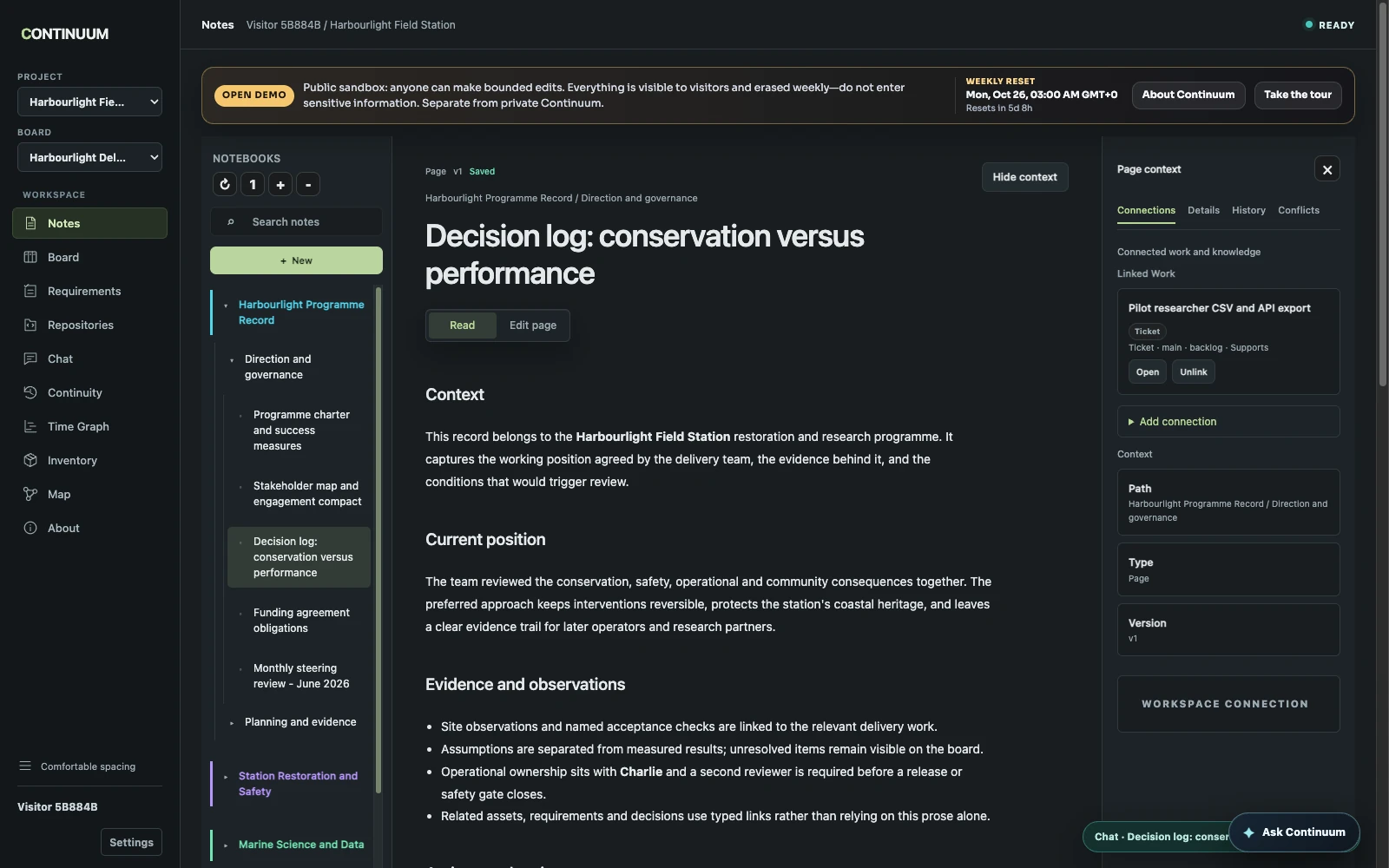
Notes gives the project a structured place for its purpose, research and decisions. Here, the conservation decision links back to the work item shown above. You can follow the connection in either direction.
The other end of the same connection: a decision in Notes links back to its work item. Both views use the same project records.
About this image
Running public web UI; fictional Harbourlight Field Station sandbox · 20 October 2026 Revision: Public demo capture 2026-10-20; image b7f57b60811b; public UI revision a2dad6e verified separately by the Continuum project
02 / Make success concrete
Know what “done” needs to mean.
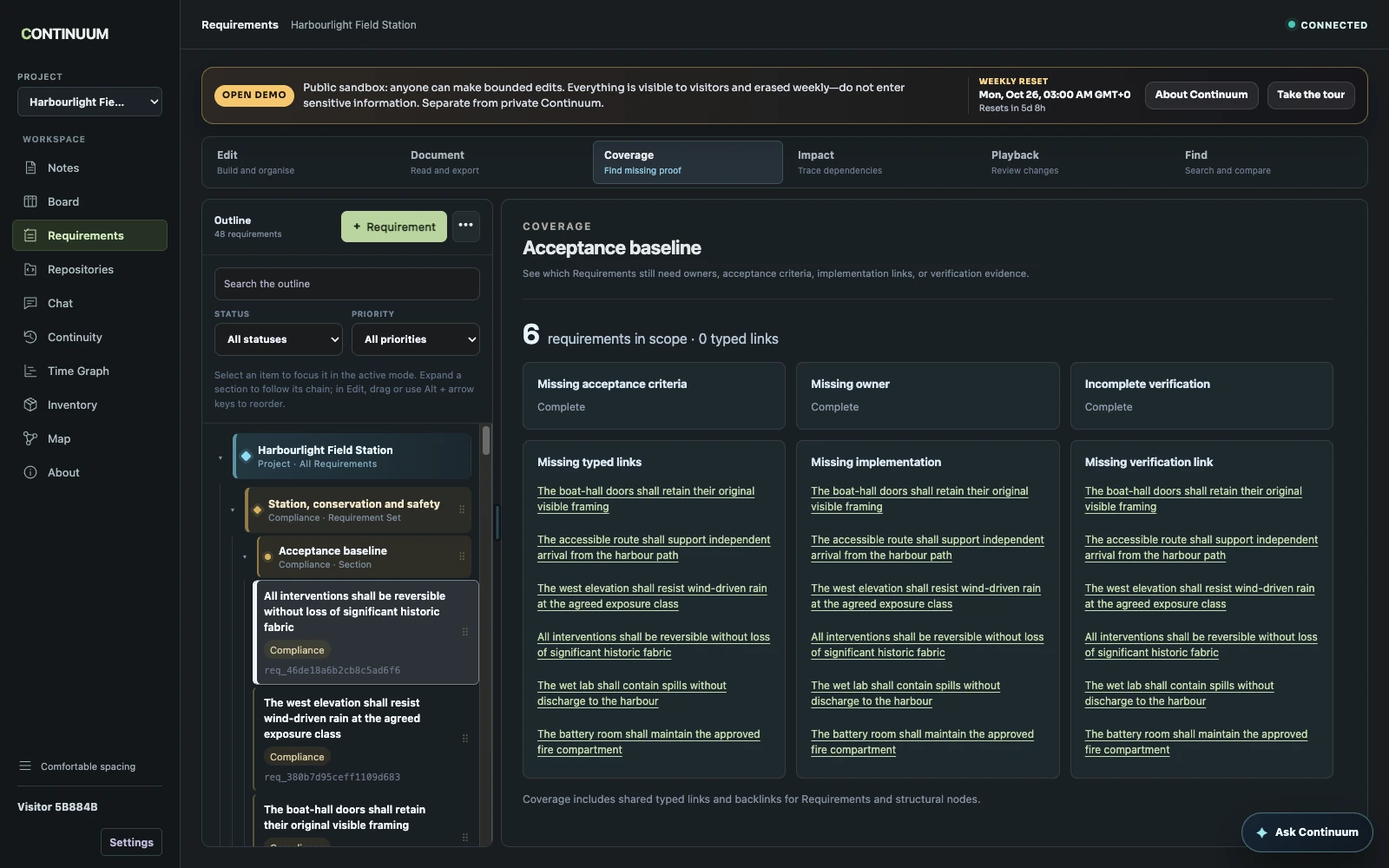
Requirements hold acceptance criteria alongside their connections to implementation and evidence. Coverage brings missing links into view, helping you distinguish a recorded status from the evidence needed to support it.
Coverage makes gaps visible. In this fictional baseline, acceptance criteria are marked complete but implementation and verification links are still missing.
About this image
Running public web UI; fictional Harbourlight Field Station sandbox · 20 October 2026 Revision: Public demo capture 2026-10-20; image 862aed0b60b7; public UI revision a2dad6e verified separately by the Continuum project
03 / See how it fits together
Follow a connection to its context.
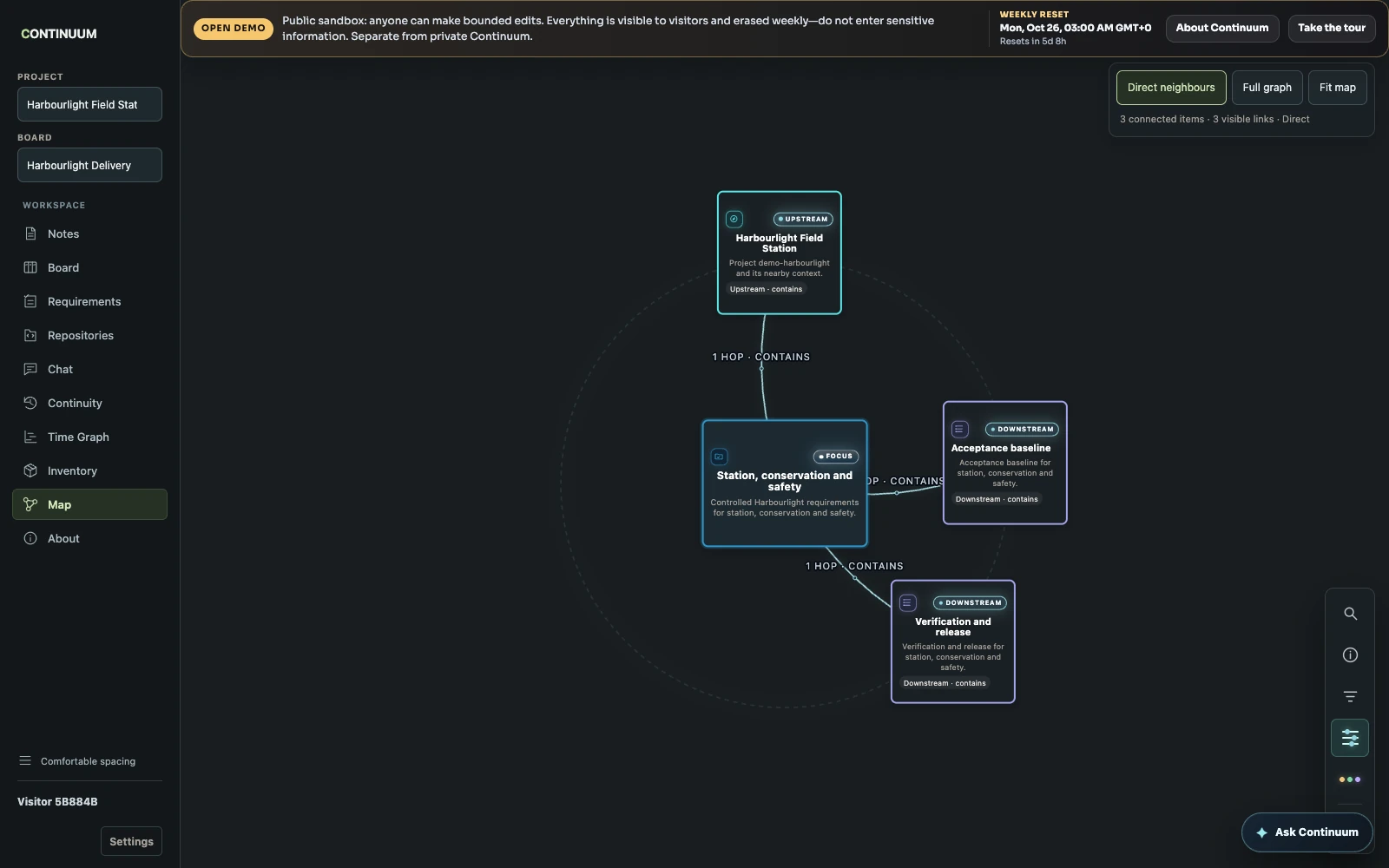
Map makes the same project relationships navigable. This focused view connects the conservation requirements to the wider project and its acceptance and verification sections.
A focused Map view follows the conservation requirement set to its parent project and its acceptance and verification sections.
About this image
Running public web UI; fictional Harbourlight Field Station sandbox · 20 October 2026 Revision: Public demo capture 2026-10-20; image 176defc925c8; public UI revision a2dad6e verified separately by the Continuum project
04 / People and AI
A useful starting point. A useful handoff.
An agent enters a named project and receives a focused starting view of current work and knowledge. It can follow relevant links and expand the records it needs, rather than treating an old conversation as the whole project.
The result goes back into the workspace: an updated task, a decision, a piece of evidence or a handoff in Project Chat. A later session can pick up from that record and check it against the current state.
I use these agent workflows in my own projects. The public demo offers a bounded way to explore the shared workspace.
05 / Product decisions
Built for work that lasts longer than a chat.
01
Put context in the project
A conversation can be the starting point, but decisions and evidence need a lasting home. Project Chat coordinates the work; Notes, Requirements and the Board retain the project’s accepted state.
02
Give relationships a meaning
A connection says why two records belong together: work implements a requirement, a decision explains a choice, or a file provides evidence. Those relationships power the views across the workspace.
03
Make changes reviewable
People and agents share project records with versions and explicit conflicts. A stale edit should be visible, rather than silently replacing someone else’s work.
04
Keep investigation separate from acceptance
Working context can be resumed through Continuity. Useful outcomes are deliberately recorded as project knowledge, requirements or evidence when they are ready.
My contribution
I created Continuum, shape the product and its project model, and develop and test it through daily use with AI collaborators.
My decisions & how it was built +
What I own
I design the product, define how project records relate, and shape the workflows used by people and agents. I combine AI-assisted implementation with hands-on use, testing and technical judgement.
A decision I made
I made project context persistent and connected, with version checks and reviewable changes. A new conversation should be able to continue the work without quietly rewriting its history.
What it builds on
Continuum uses a Python backend, web technologies and native platform clients. Its linked project model, agent entry workflow and rules for changing records are built for Continuum.
06 / Evolution
Shaped by the work it supports.
Foundation
Connect work and project knowledge
The initial model joined a task hierarchy and a notebook hierarchy through shared links, history and explicit conflicts.
Traceability
Give requirements their own structure
Requirements became individual, verifiable records with acceptance criteria, coverage and links to implementation and evidence.
Continuation
Support work beyond one conversation
Bounded agent entry, resumable working context and persistent project communication extended the model to long-running human and agent collaboration.
Broader use
Keep the model coherent as it grows
Media, inventory, source references and deployment records connect back to the same project, while the public sandbox makes that model available to explore.
Workspace UI
Keep the project in view
A persistent navigation sidebar connects the updated Notes, Board, Requirements and Map surfaces. The current public demo uses Harbourlight Field Station, matching the walkthrough and screenshots here.
07 / Under the hood
One project, several ways in.
Shared backend, several clients +
A Python backend serves the web workspace and project APIs. macOS and iOS clients connect to the same state, with a separate Windows client under development.
Versioned changes +
Expected versions, operation identities, history and conflict records provide a concrete basis for reconnecting clients and reviewable agent writes.
A typed project graph +
Knowledge, requirements, cards, files and other project entities share a relationship model, so context and evidence can be traversed across surfaces.
Bounded retrieval +
Agent entry ranks relevant work and knowledge before expanding full records. Temporary checkpoints can be restored selectively instead of carrying an entire investigation into every request.
Physical items and project evidence +
Inventory keeps items and locations within the project. Media, files and source references can connect to the work they support, extending the model beyond tasks and documents.
Release records and observed results +
Deployment records describe the intended environment, release and recovery path. Dated observations capture what was checked. The deployment tools perform the release; Continuum keeps that work and its evidence connected.
08 / Try it today
In use. Still taking shape.
Continuum supports its own development and the wider work in this portfolio. The web workspace and agent workflows are in use; native clients extend access to the same project records.
The public demo is an invitation to explore how it works today. A supported self-hosted installation and update experience, and greater consistency across clients, are still being developed.
Where I’m taking it
Make the first project easier to set up and understand.
Improve consistency across web and native clients.
Qualify a supported self-hosted installation and update path.
 View full size ↗